★★★★★
“Used to rewrite the same prompt four or five times. Now I dump it in and paste what comes out.”
Turn one rough idea or screenshot into a complete, paste ready prompt. Your AI gets the context, requirements, states, and constraints before it starts building. Fewer retries. Lower usage. Faster shipping.
Modeled across current Claude, GPT, Grok, and Gemini pricing. Every count uses the same correction loop baseline shown in the product.
Benchmark model, not a live customer counter. Rates checked 2026-07-22.
Copy plain text into the tool you already use. No plugin. No setup ritual. No locked ecosystem.
Choose the input you have. tknctrl builds the instruction your AI needs.
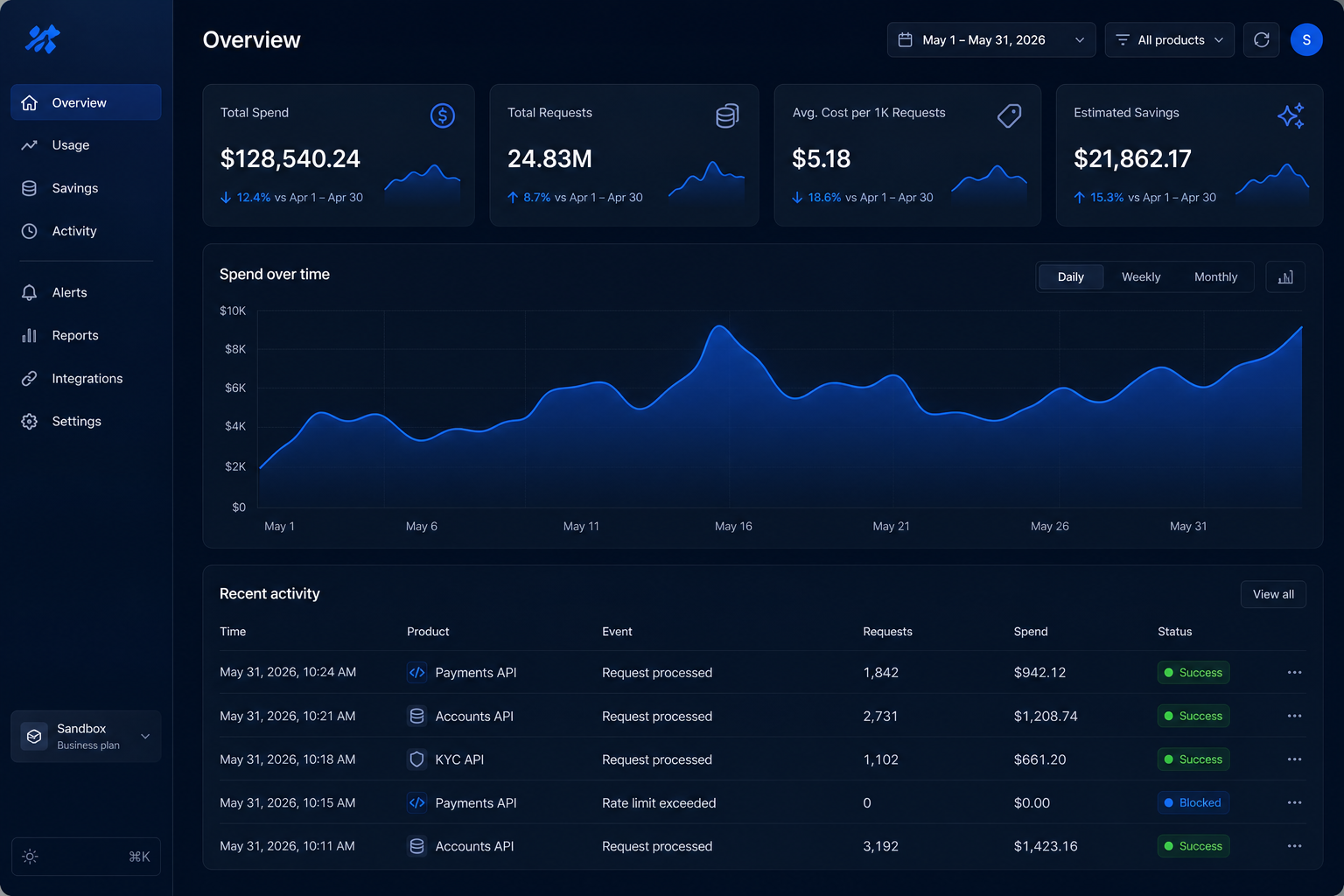
recreate this interface from my screenshot
Act as a senior product engineer. Recreate the attached analytics dashboard as a working responsive interface.

VISUAL SYSTEM
Use a deep navy canvas, cobalt active states, subtle glass borders, 14px card radius, compact navigation, and restrained shadows. Match the spacing and hierarchy visible in the reference.

LAYOUT
Build a fixed left sidebar, utility header, four metric cards, responsive area chart, filter controls, and recent activity table.

BEHAVIOR
Add sidebar navigation states, date filter, chart period controls, loading skeletons, empty data, API error, and a mobile drawer below 768px.

DELIVERABLE
Return production ready Next.js and React code with accessible semantic markup. No placeholder boxes and no invented sections.
Upload any interface from Pinterest, Dribbble, Figma, or the open web. tknctrl reads the visual system and writes the complete coding prompt.
Layout · visual tokens · components · responsive rules · loading and error states
The dashboard uses the same official rates to update your token and dollar counters.
Rates checked 2026-07-22. Subscription products use limits rather than itemized token billing.
“Used to rewrite the same prompt four or five times. Now I dump it in and paste what comes out.”
“The image mode figured out the product scene without me explaining every detail.”
“Cursor kept producing generic output until I started running my prompts through this first.”
“I use it before every Claude session now. I do not remember how I worked before.”
“It captured the CSS values, blur amounts, and animation curves from one screenshot.”
“API costs went down noticeably. I checked the usage dashboard instead of guessing.”
“Twenty minutes of back and forth became one paste. It happens every time.”
“The combined product scene prompt was exactly what I needed. No manual tweaking.”
“I stopped fighting with ChatGPT halfway through the task. This just gets it done.”
“First time an AI built what I actually meant from the first message.”
“Used to rewrite the same prompt four or five times. Now I dump it in and paste what comes out.”
“The image mode figured out the product scene without me explaining every detail.”
“Cursor kept producing generic output until I started running my prompts through this first.”
“I use it before every Claude session now. I do not remember how I worked before.”
“It captured the CSS values, blur amounts, and animation curves from one screenshot.”
“API costs went down noticeably. I checked the usage dashboard instead of guessing.”
“Twenty minutes of back and forth became one paste. It happens every time.”
“The combined product scene prompt was exactly what I needed. No manual tweaking.”
“I stopped fighting with ChatGPT halfway through the task. This just gets it done.”
“First time an AI built what I actually meant from the first message.”
“Used to rewrite the same prompt four or five times. Now I dump it in and paste what comes out.”
“The image mode figured out the product scene without me explaining every detail.”
“Cursor kept producing generic output until I started running my prompts through this first.”
“I use it before every Claude session now. I do not remember how I worked before.”
“It captured the CSS values, blur amounts, and animation curves from one screenshot.”
“API costs went down noticeably. I checked the usage dashboard instead of guessing.”
“Twenty minutes of back and forth became one paste. It happens every time.”
“The combined product scene prompt was exactly what I needed. No manual tweaking.”
“I stopped fighting with ChatGPT halfway through the task. This just gets it done.”
“First time an AI built what I actually meant from the first message.”
Try the complete workflow once for free. Upgrade when the saved time and AI usage make the choice obvious.
$7.42 per month · two months free
No. It creates the complete prompt. You copy that prompt into Cursor, Claude, GPT, Grok, Gemini, v0, or any tool that accepts text.
You choose the model. tknctrl applies its published input and output rates to one complete prompt and compares it with the correction loop baseline.
That adds another AI round and usually rewrites your wording without filling every missing product decision, state, and implementation constraint.
Yes. Upload a UI image and tknctrl converts layout, type, color, behavior, and responsive rules into a coding brief.
Write the thought exactly as it appears in your head. tknctrl will build the rest.